Launch your own HTML5 gaming portal.
Everything you need to install, activate, configure and grow your game portal, from the first upload to your first payout. Thank you for choosing Arcadify!
Introduction
Arcadify is a self-hosted portal for free online HTML5 games. It imports thousands of games from the major distribution networks, keeps them in sync, and turns visitors into a community with levels, achievements, a Wall of Fame and optional play-and-earn reward events, all managed from a polished admin panel.
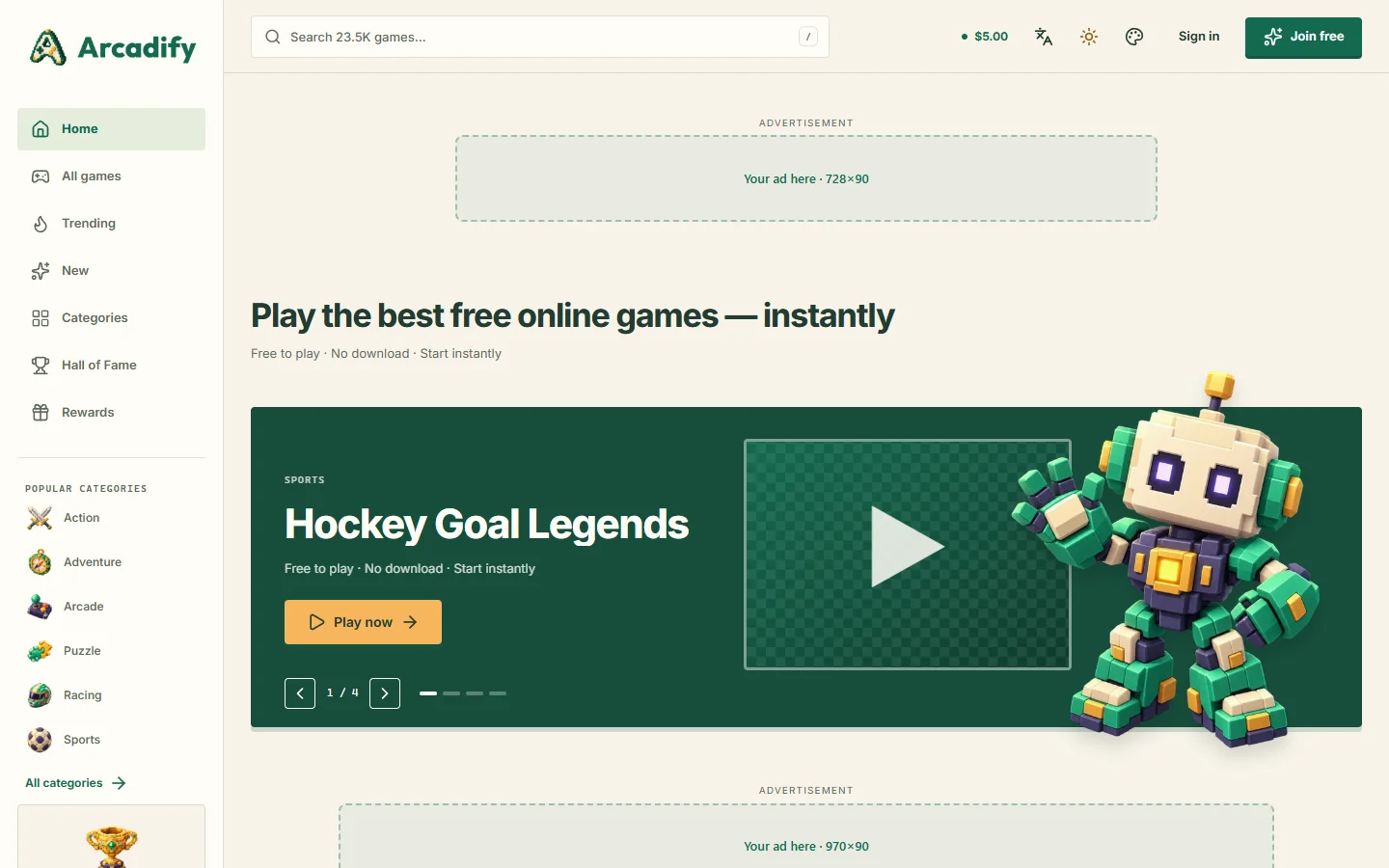
Huge catalogue
Import from GameDistribution, GameMonetize, GamePix, Famobi, Gamezop and HTMLGames, with nightly sync of the newest games.
Six languages
English, Arabic (RTL), Chinese, Hindi, Spanish and French: every screen, email and form message. Add more from the admin panel.
Community & XP
Profiles, 100 levels with 16 honor emblems, achievements, comments, likes, favourites and the Wall of Fame.
Play & earn
Time-limited reward events with wallets and withdrawals that you approve. Switch the feature off with one toggle.
Monetisation
Ad units for 12 placements, pre-roll ads, ads.txt, and provider revenue-share IDs added to every game.
Shared-hosting ready
Upload to public_html and run the web installer. No terminal and no document-root changes.
arcadify folder to your hosting account, open https://your-domain.com/install and follow the wizard. Then add the cron job shown on the last screen.Package contents
| Folder | Contents |
|---|---|
arcadify/ | The application. Upload the contents of this folder to your server. |
documentation/ | This guide. Open index.html in any browser; it works offline. |
Inside the application, the folders you are most likely to touch are:
| Path | Purpose |
|---|---|
public/ | The web root: front controller, compiled assets, uploads and published theme files. |
themes/ | Theme sources (theme.json, CSS, optional view and language overrides). |
lang/ | Bundled translations: interface texts (en.json, ar.json…) and form and email messages (ar/validation.php…). Edits made in the admin panel are stored in the database and survive updates. |
storage/ | Logs, caches, sessions, the license certificate and private files. Must be writable. |
.env | Created by the installer. Holds the database connection and the application key. |
Server requirements
| Requirement | Details |
|---|---|
| PHP | 8.2 or newer (8.3 and 8.4 are supported) |
| PHP extensions | bcmath, ctype, curl, dom, fileinfo, filter, gd, intl, json, mbstring, openssl, pdo, pdo_mysql, tokenizer, xml, zip. sodium is used when available (a bundled fallback verifies signatures otherwise); imagick is optional. |
| Database | MySQL 5.7.8+ or MariaDB 10.3+ |
| Web server | Apache or LiteSpeed with mod_rewrite, or Nginx |
| PHP limits | memory_limit 256M recommended · max_execution_time 60 seconds or more · upload_max_filesize 32M or more (theme and game uploads) |
| Outgoing connections | cURL or allow_url_fopen, to import games, activate the license and download updates |
| HTTPS | Strongly recommended. Browsers require it for fullscreen games, app installation and secure sign-in. |
| Cron | One cron job every minute (see Cron job); a visitor-driven fallback runs when there is none. |
The installer checks all of this and tells you exactly what to fix. Your host can enable missing extensions in a few clicks (in cPanel: Select PHP Version → Extensions).
innodb_buffer_pool_size should be at least 128M (the default on most hosts) so listings and search stay fast.Installation
Shared hosting (cPanel, Plesk, DirectAdmin)
- Create a database. In cPanel open MySQL® Database Wizard, create a database and a user, and give the user All privileges. Write down the database name, user name and password.
- Upload the files. Open File Manager, go to
public_html(or a sub-folder such aspublic_html/games), upload a zip of thearcadifyfolder's contents and extract it there. - Run the installer. Visit
https://your-domain.com/install(orhttps://your-domain.com/games/installfor a sub-folder) and follow the wizard below. - Add the cron job shown on the last installer screen.
You do not need to change the document root: the .htaccess file in the application folder routes every request into public/, blocks hidden files such as .env, and keeps application code out of reach.
.htaccess in both the application folder and public/.The installation wizard
The wizard is available in all six languages and takes about two minutes. Each step is checked before you can continue.
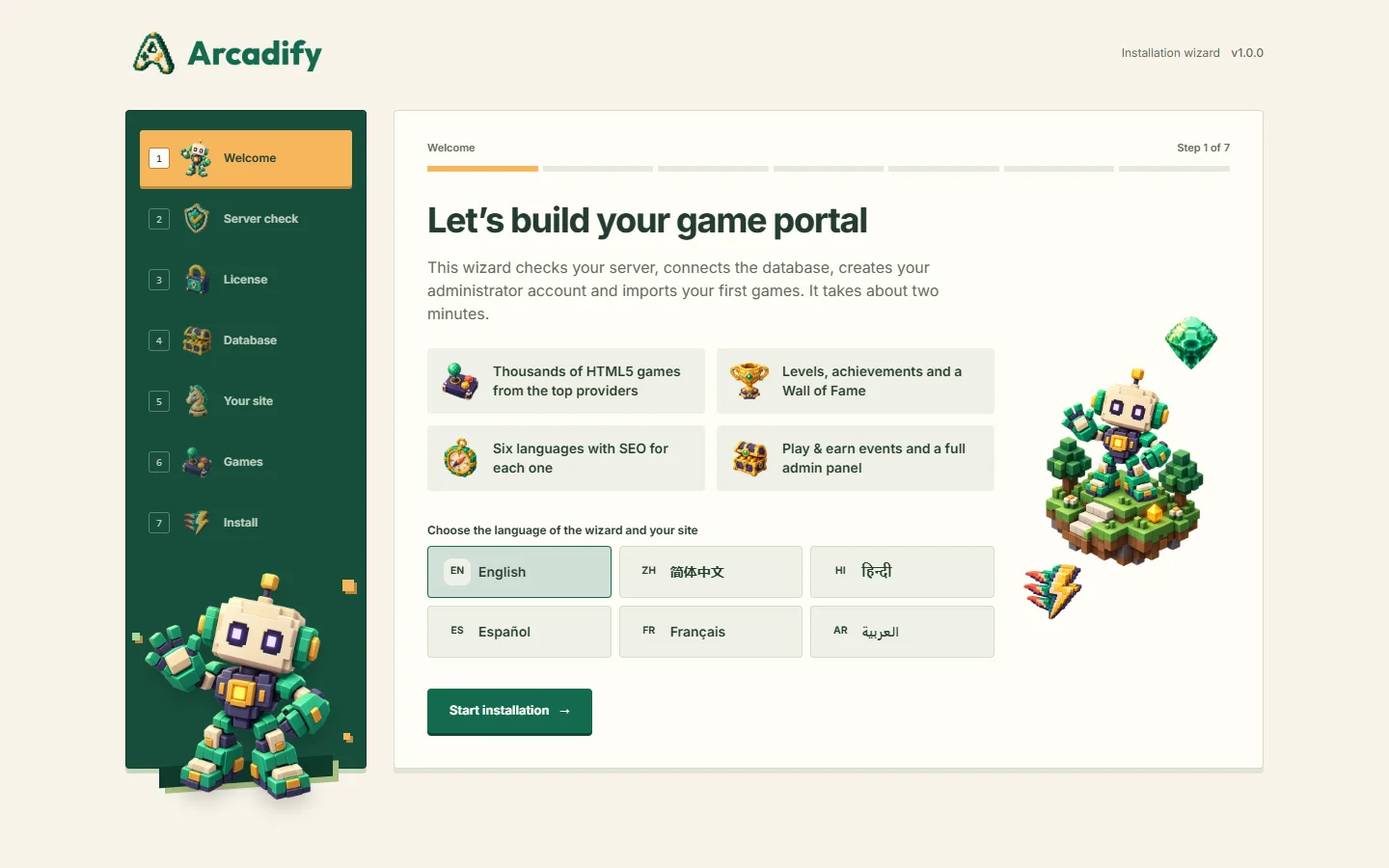
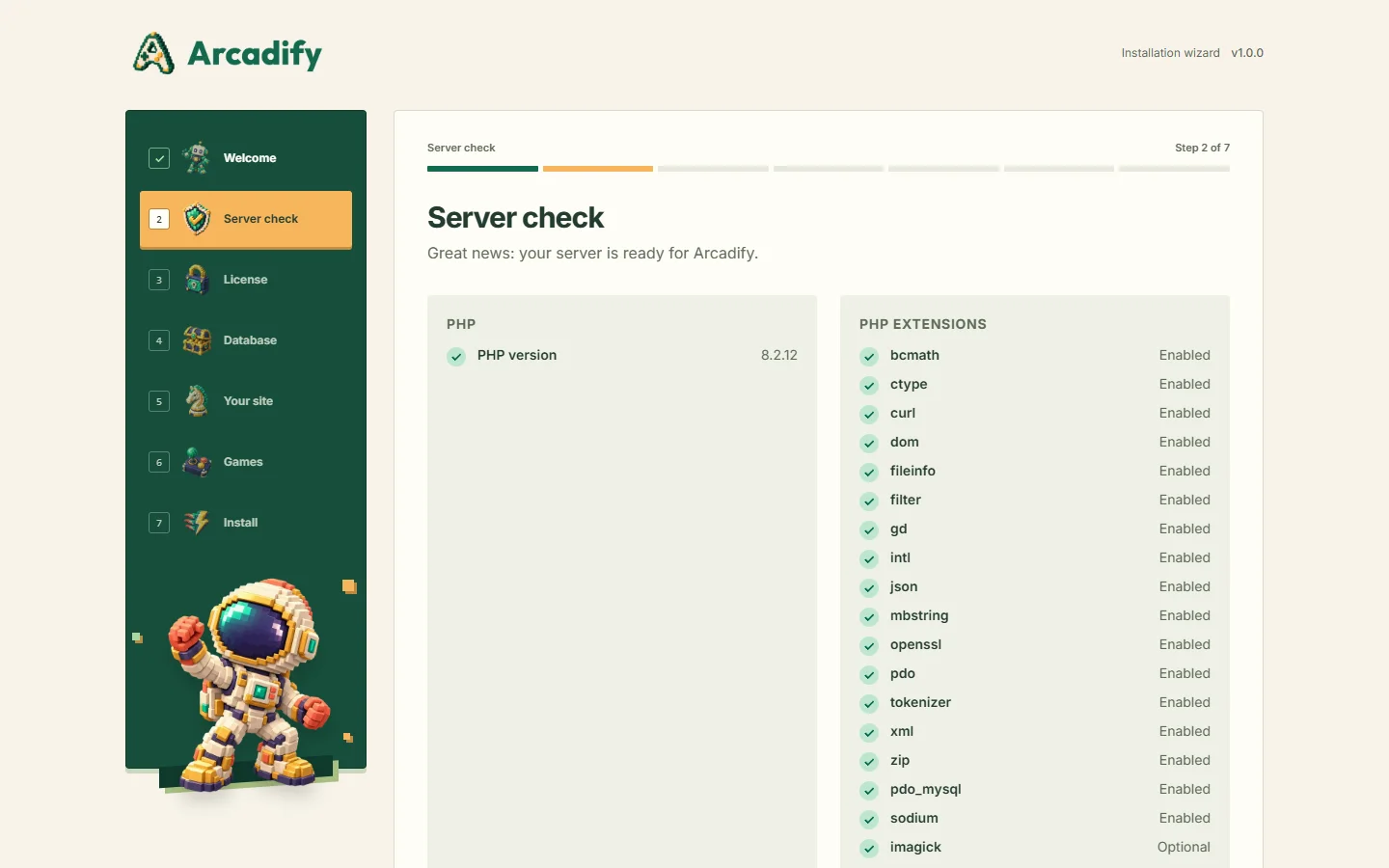

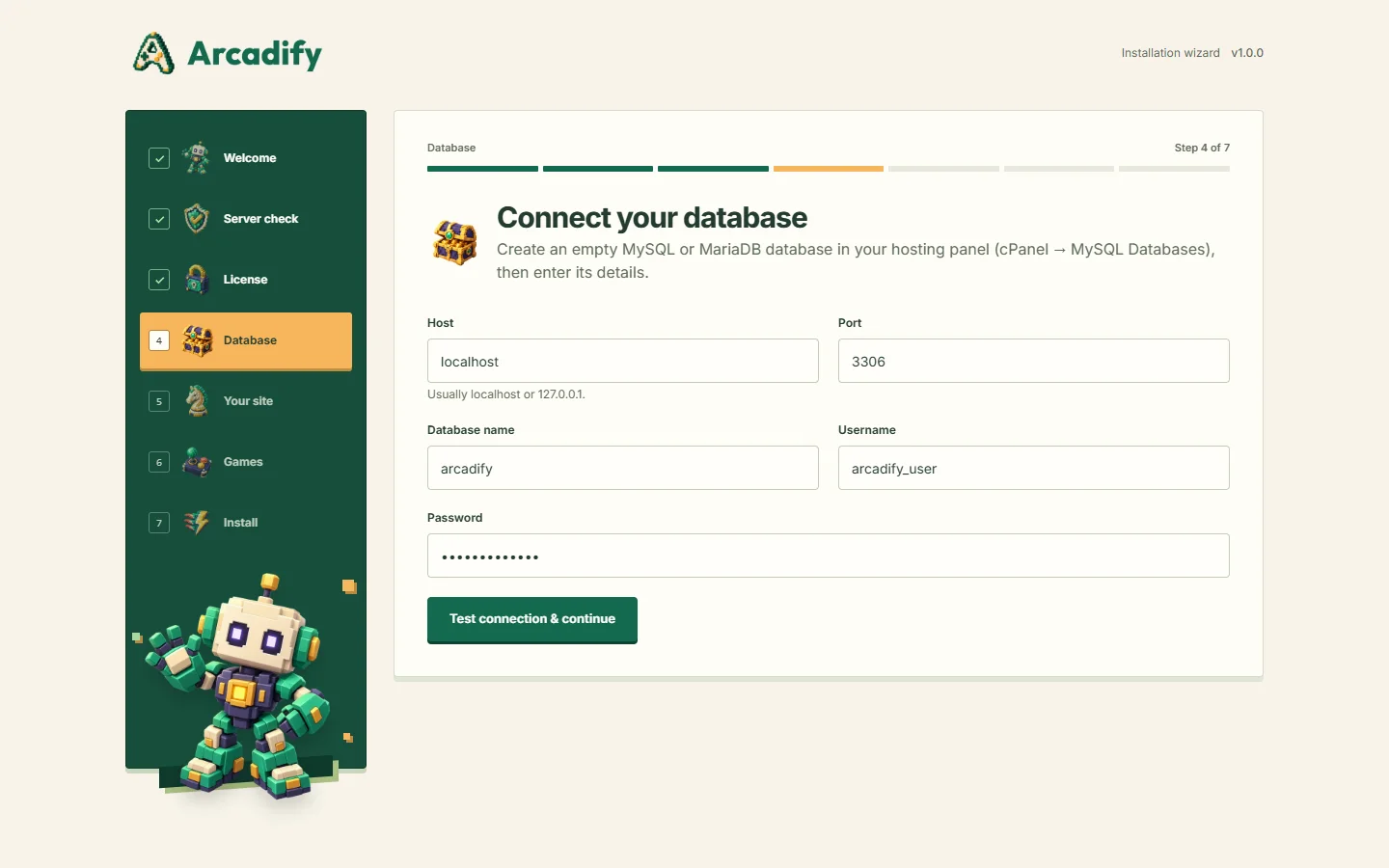
localhost), port 3306, database, user and password. The connection is tested before you continue.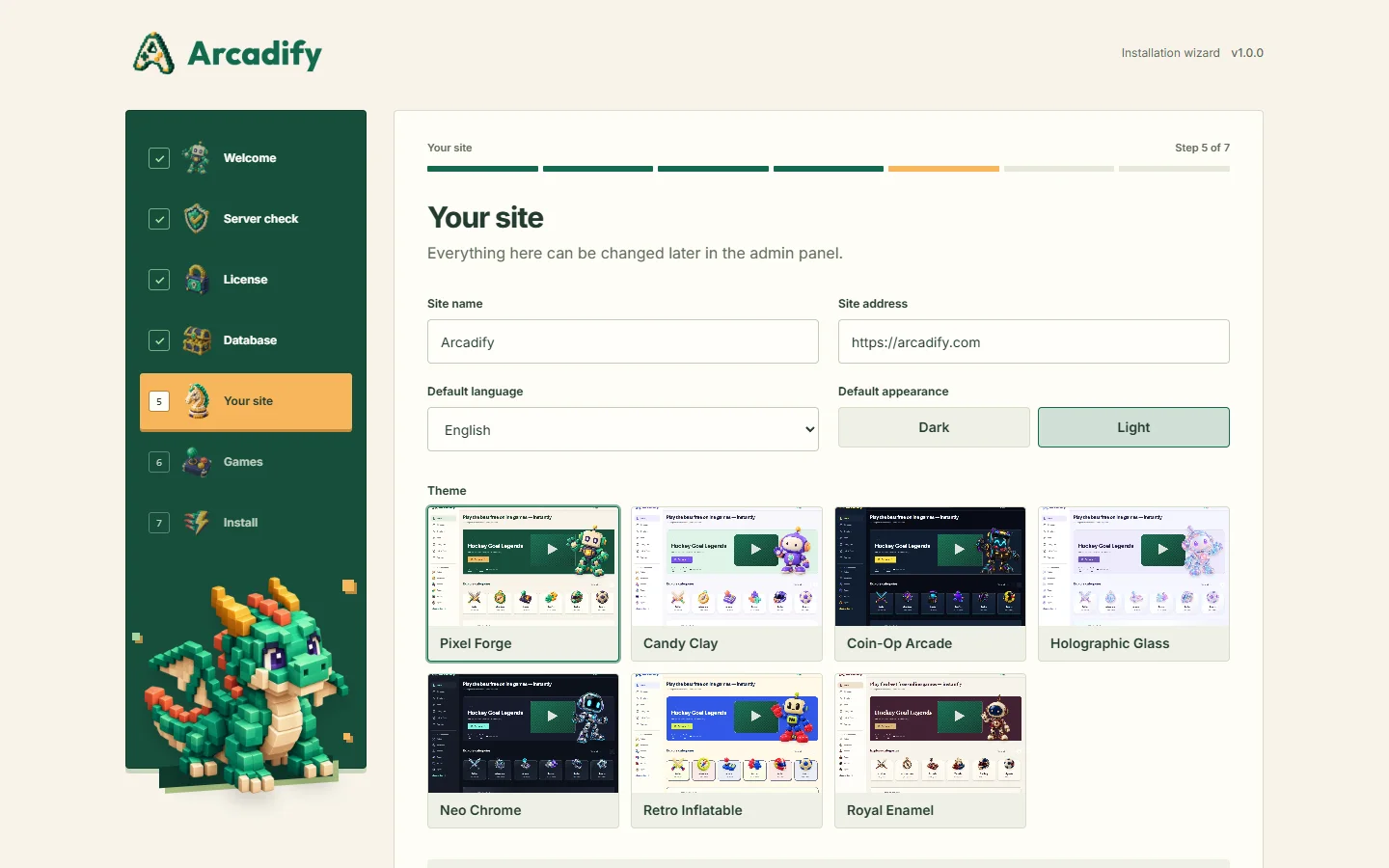


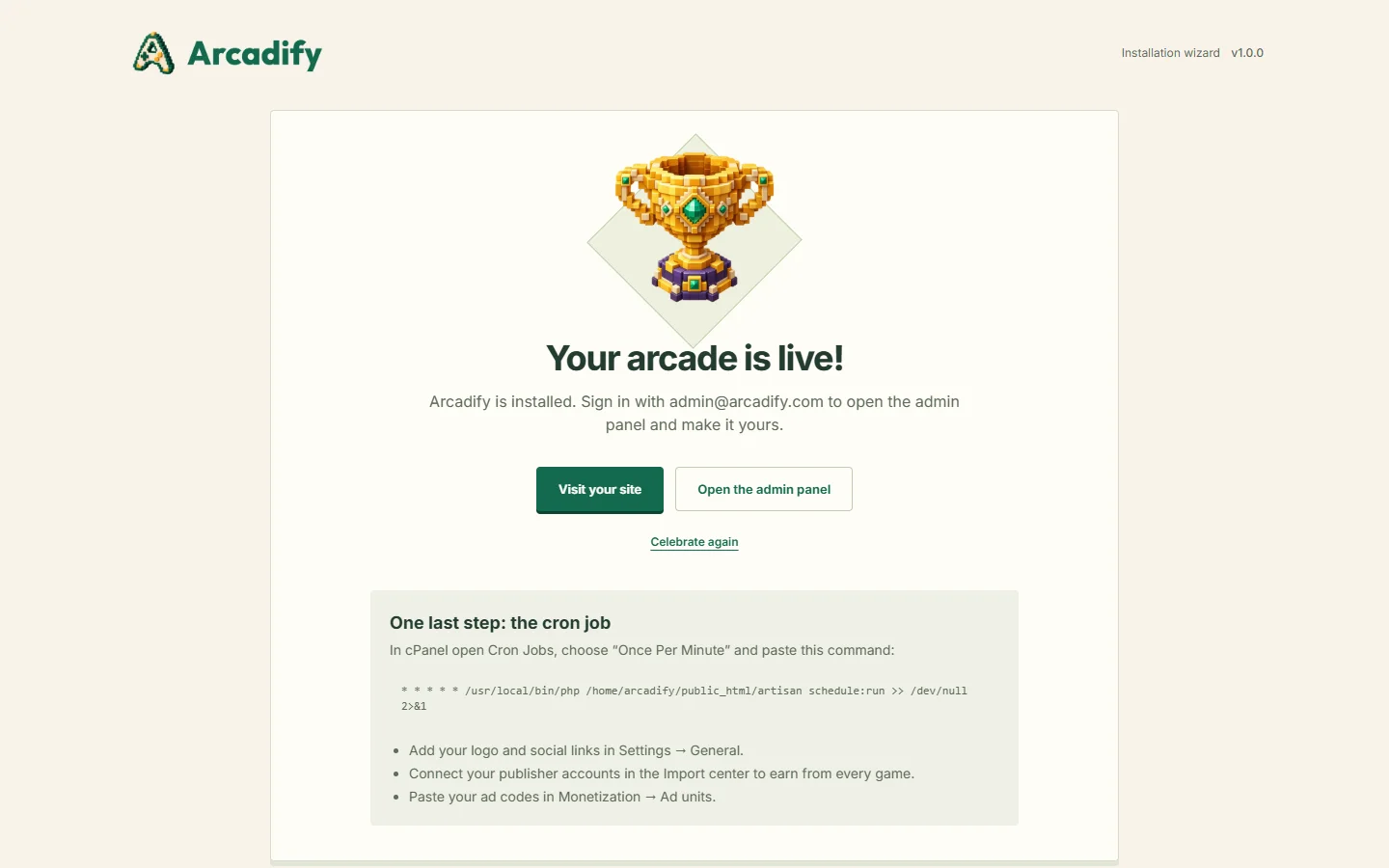
/install is locked. To start over, delete storage/app/installed.json and .env, empty the database and open /install again.VPS, dedicated servers and Nginx
When you control the server, point the document root at the public folder, which is the most secure setup. For Nginx:
server {
    listen 80;
    server_name example.com;
    root /var/www/arcadify/public;
    index index.php;

    location / {
        try_files $uri $uri/ /index.php?$query_string;
    }

    location ~ \.php$ {
        include fastcgi_params;
        fastcgi_param SCRIPT_FILENAME $realpath_root$fastcgi_script_name;
        fastcgi_pass unix:/run/php/php8.2-fpm.sock;
    }

    location ~ /\.(?!well-known).* {
        deny all;
    }
}
Give the web server user write access to storage/, bootstrap/cache/, public/uploads/, public/themes/, themes/ and, during installation, the application folder itself (so the installer can create .env):
chown -R www-data:www-data /var/www/arcadify
find /var/www/arcadify -type d -exec chmod 755 {} \;
find /var/www/arcadify -type f -exec chmod 644 {} \;
Cron job
Arcadify uses one cron entry that runs every minute. The exact line for your server, with the correct PHP path, is shown at the end of the installer and under Admin → System → System health. It looks like this:
* * * * * /usr/local/bin/php /home/USER/public_html/artisan schedule:run >> /dev/null 2>&1In cPanel open Cron Jobs, choose Once Per Minute, paste the command and save. Without cron, background tasks still run while visitors browse, just less precisely; System health warns you when the scheduler has been silent.
| Task | Frequency |
|---|---|
| Queue worker (emails, notifications) | Every minute |
| IndexNow notifications to search engines | Every 10 minutes |
| "Similar games" recommendations | Every 30 minutes |
| Trending scores | Hourly |
| Provider sync (new games) | Daily at 03:30 |
| License certificate refresh | Daily at 04:10 |
| Clean-up of old play sessions, search logs, read notifications and import history | Daily at 04:40 |
License activation
Your license is managed by the EKR license portal at ekr-portal.cloud. Activation unlocks signed one-click updates and support, and is done once per domain.
- The installer asks for activation on a live domain. Local and staging addresses never need it:
localhost,127.0.0.1,*.localhost,*.test,*.localand private-network IP addresses. - You can also activate, re-check or deactivate later in Admin → System → License.
- Activation sends your code, your domain and an anonymous installation ID to the portal over an encrypted connection. The portal answers with a certificate signed with Ed25519, which your site verifies and stores.
- The certificate is renewed daily. Short outages of the license server have no effect: there is a 14-day offline grace period.
- A Regular license covers one production domain; an Extended license covers up to five.
Where is my code?
| You bought on | What to do |
|---|---|
| A marketplace or store | Sign in at ekr-portal.cloud (create a free account if needed) and add your purchase under Licenses. Then paste your purchase code, or the EKR license key you receive, in the installer. |
| EKR license key | Already have a key that starts with EKR- (for example from support or a reviewer note)? Paste it as it is. |

Activation messages
| Message | What it means and what to do |
|---|---|
| We could not find this code | The portal does not know this code yet. Add the purchase to your EKR account first (Licenses), or use the EKR license key you received. |
| This license is not linked to Arcadify | The code belongs to another product, or the license still needs to be linked. Use your Arcadify code or contact support. |
| Maximum number of domains | The license is already active on its allowed domains. Free one in your EKR account, or deactivate the old site in Admin → License first. |
| Inactive or suspended | The license was disabled on the portal (refunds, abuse). Contact support. |
| This address cannot be activated | Open the installer from your real domain (for example https://example.com), not an IP address or a temporary URL. |
| Too many attempts | Wait one minute and try again. |
| The license server could not be reached | Your server cannot make outgoing HTTPS requests to ekr-portal.cloud. Ask your host to allow it (cURL with OpenSSL). |
Admin panel
Sign in with your administrator account and open /admin. The panel follows your language (right-to-left for Arabic) and supports light and dark mode.
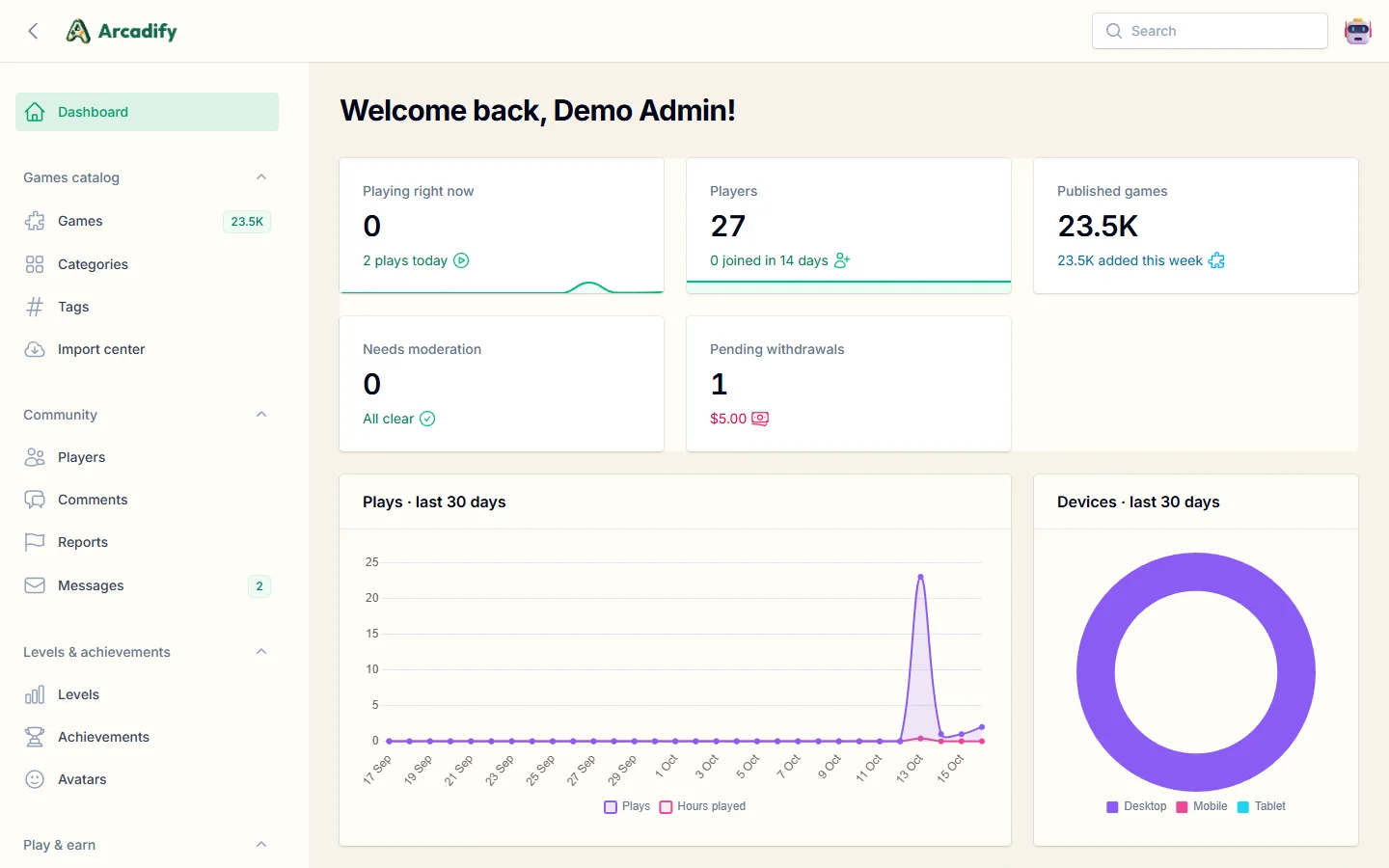
| Group | Sections |
|---|---|
| Games catalog | Games, Categories, Tags, Import center (providers) |
| Community | Players, Comments, Reports, Messages |
| Levels & achievements | Levels, Achievements, Avatars |
| Play & earn | Reward events, Withdrawals, Wallet transactions |
| Site content | Pages, Menus, Banners & hero slides, Redirects |
| Monetization | Ad units |
| Languages & settings | Languages, Translations, and 17 settings pages: General, Appearance, Home page, XP & gameplay, Comments, Accounts & sign-in, Email delivery, Spam protection, SEO, Search engines & analytics, Advertising, Play & earn, Recommendations, Custom code, Privacy & cookies, Performance, Translation |
| System | Themes, License, Updates, System health, Activity log |
Logo, favicon, site name, tagline, contact email and social profiles live in Settings → General. Image fields accept an upload or an image URL (downloaded to your server); icon fields also offer the built-in 3D icon library.

Staff roles
| Role | Access |
|---|---|
| Administrator | Everything, including settings, themes, license, updates and staff accounts. |
| Moderator | Games, categories, tags, players, comments, reports and messages. Moderators manage player accounts only: staff accounts (moderators and administrators) can be changed by administrators alone. |
| Player | The public site and their own account. |
Change a member's role in Community → Players → Edit → Role. Every sensitive change (XP or wallet adjustments, license, updates, maintenance tools) is written to the activity log.
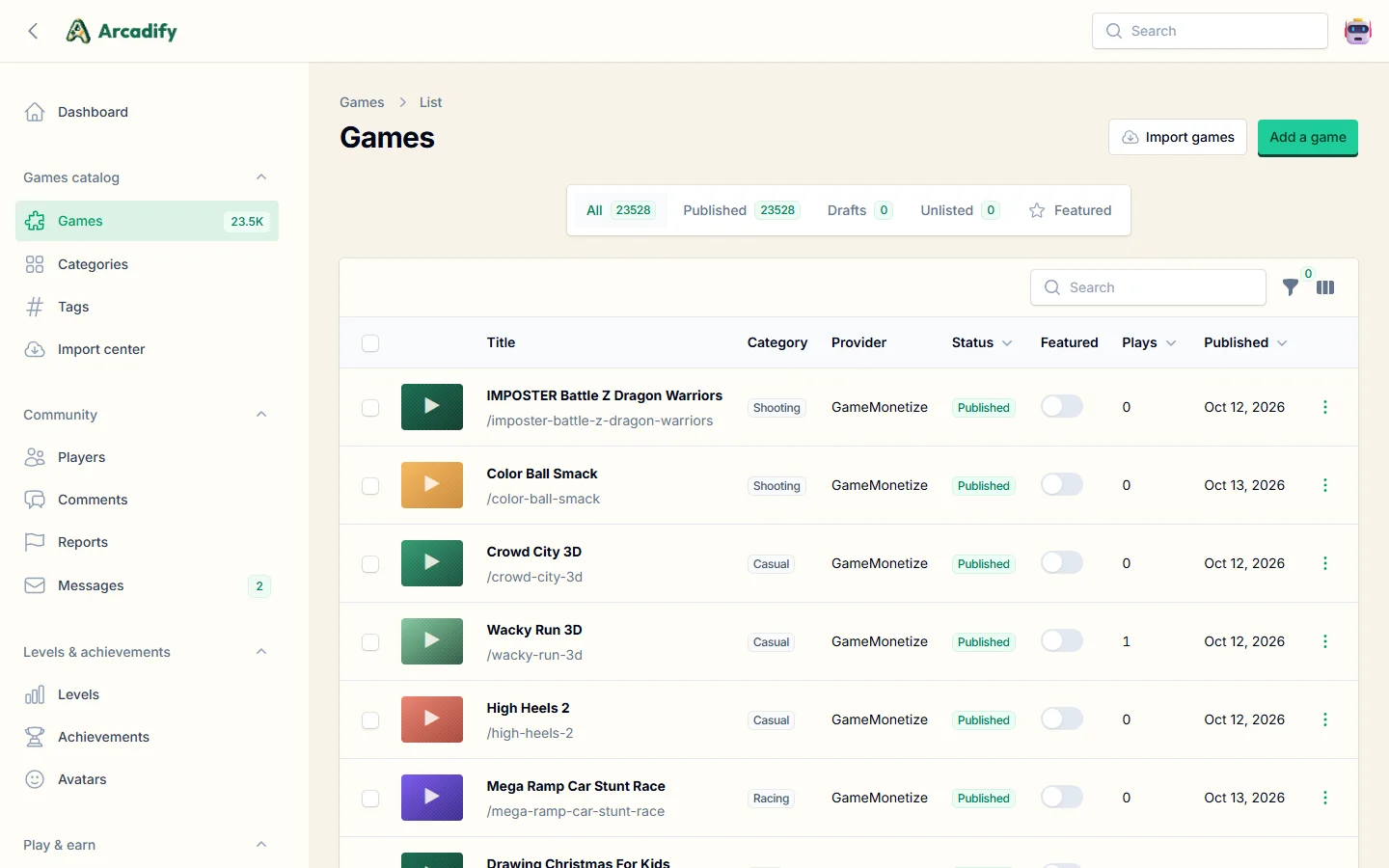
Games & providers
The Import center (Games catalog → Import center) connects your publisher accounts and pulls the latest games from each network. Publisher and revenue-share parameters are added to every game's embed address automatically, so you earn from the ads the networks show inside their games.

| Provider | What to enter |
|---|---|
| GameDistribution | No credentials needed |
| GameMonetize | No credentials needed |
| GamePix | Publisher site ID (sid), from the GamePix publisher dashboard → Sites |
| Famobi | Affiliate ID (A-XXXXX), shown in your Famobi partner account |
| Gamezop | The numeric property ID of your Gamezop publisher account |
| HTMLGames | No credentials needed |
- Import now: open a provider, choose how many games and click Import games. Large imports run in batches.
- Nightly sync: enable Import new games automatically every night on each provider.
- Copy thumbnails: optionally store imported images on your server (about 30 KB per game) to be independent from provider CDNs.
- Your own games: Games → Add a game supports iframe embeds (an
https://address) and self-hosted HTML5 packages. - Game of the Week is picked automatically from the most played games of the last 7 days, or pinned in Settings → Home page.
Changing a game, category or tag slug adds a 301 redirect automatically; manage all redirects under Site content → Redirects.
Home page builder
Settings → Home page arranges the home page without code: reorder sections by drag and drop, switch them on or off, rename them, and choose how each one looks.
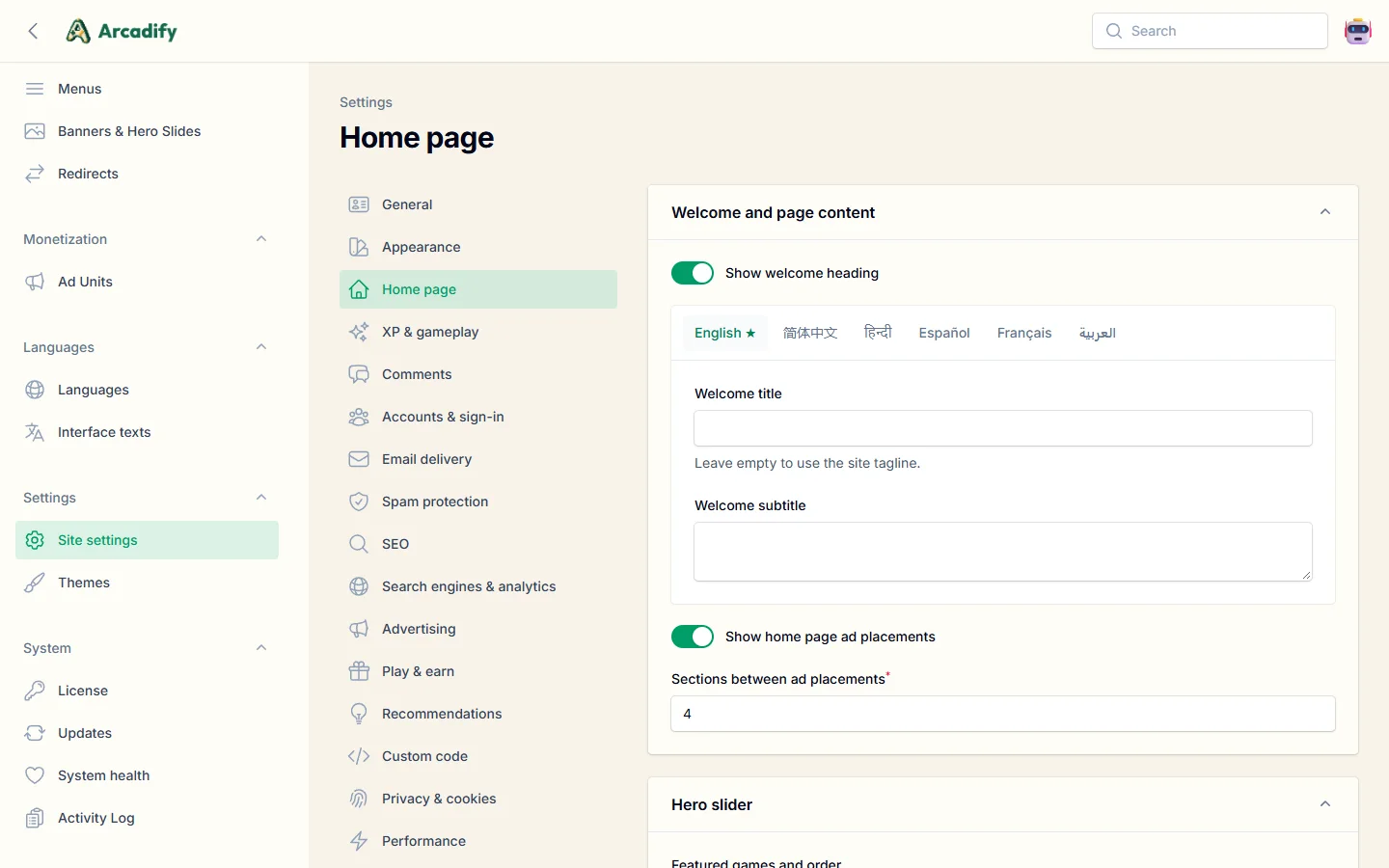
- Hero slider: featured games or your banners, autoplay timing, arrows, indicators and the theme character.
- Category carousel: categories and artwork, icon size, autoplay and game counts.
- Game shelves: trending, new, most played, top rated, featured or any category, with card or row layouts.
- Reward events: live or upcoming events with their prizes and countdown, linking to the rewards hub.
- Ads between sections: choose how many sections separate two ad placements.
Languages & translations
Arcadify ships fully translated into English, Arabic, Chinese (Simplified), Hindi, Spanish and French: over 1,500 interface texts, plus form validation, sign-in and email messages. Arabic switches the whole site, admin panel and installer to right-to-left.
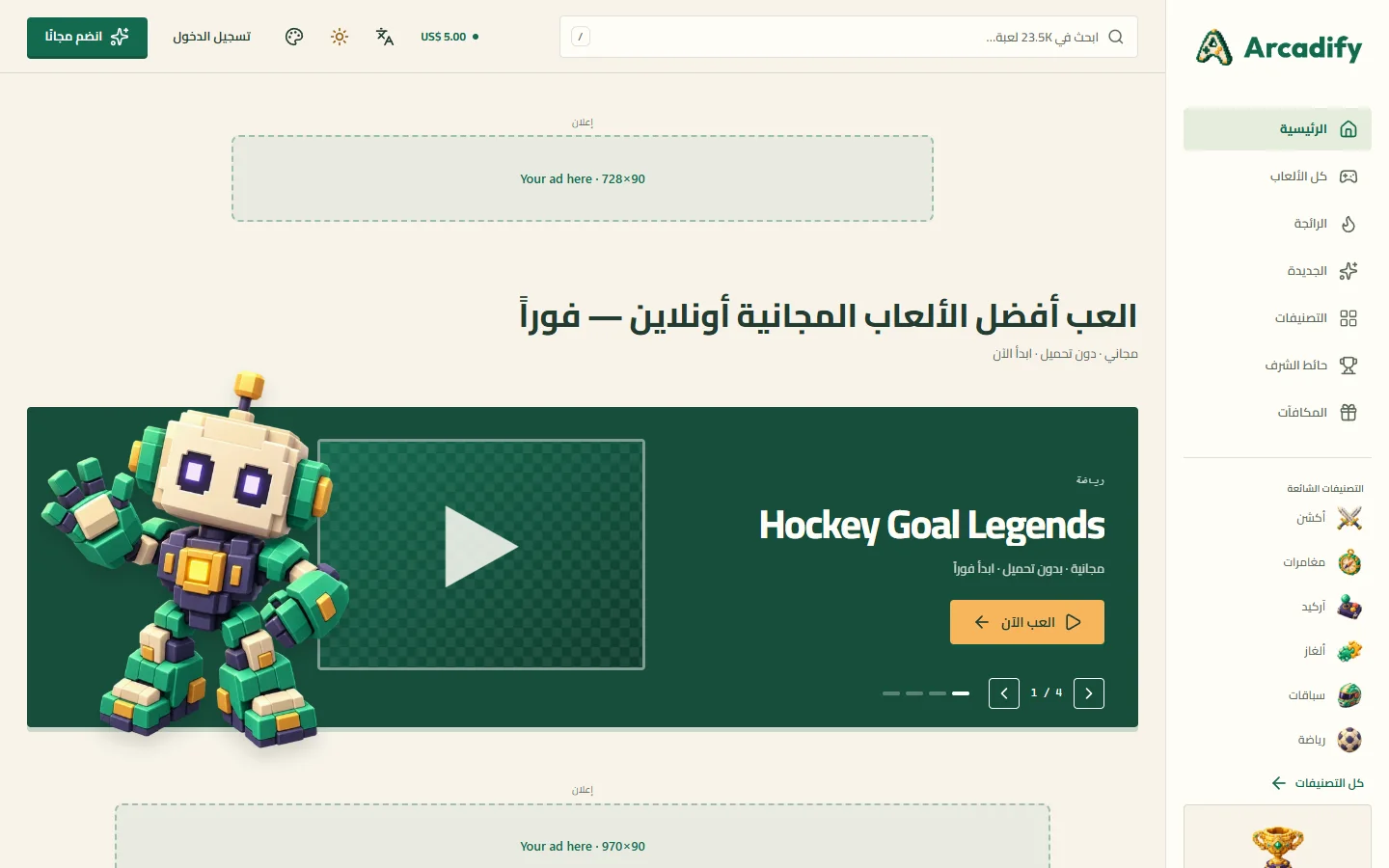
Language settings
- Languages & settings → Languages: activate, deactivate, reorder, set the default language and the hreflang code.
- The default language uses addresses without a prefix (
example.com/game/x); other languages use one (example.com/fr/game/x).
Editing texts
Translations lists every interface text side by side with English. Changes go live immediately and are stored in the database, so updates never overwrite them. Export a language to JSON, edit it elsewhere and import it back, or reset it to the bundled translation.

Adding a language
- Create the language in Languages (code such as
deorpt-BR, names, text direction and flag). - Open Translations and translate the texts manually, by importing a JSON file, or with Translate missing automatically.
- For form and email messages in the new language, copy
lang/estolang/{code}and translate the values.
Machine translation
Configure DeepL, Google Cloud Translation or LibreTranslate in Settings → Translation. It fills missing interface texts and can translate the descriptions of newly imported games. Placeholders such as :name are protected automatically.
Content (game titles and descriptions, categories, pages, banners, menus, achievements…) is translatable per language directly in each edit form.
Themes
Arcadify includes seven complete themes: Pixel Forge (default), Candy Clay, Coin-Op Arcade, Holographic Glass, Neo Chrome, Retro Inflatable and Royal Enamel. Each has light and dark modes, right-to-left support and its own 3D artwork.
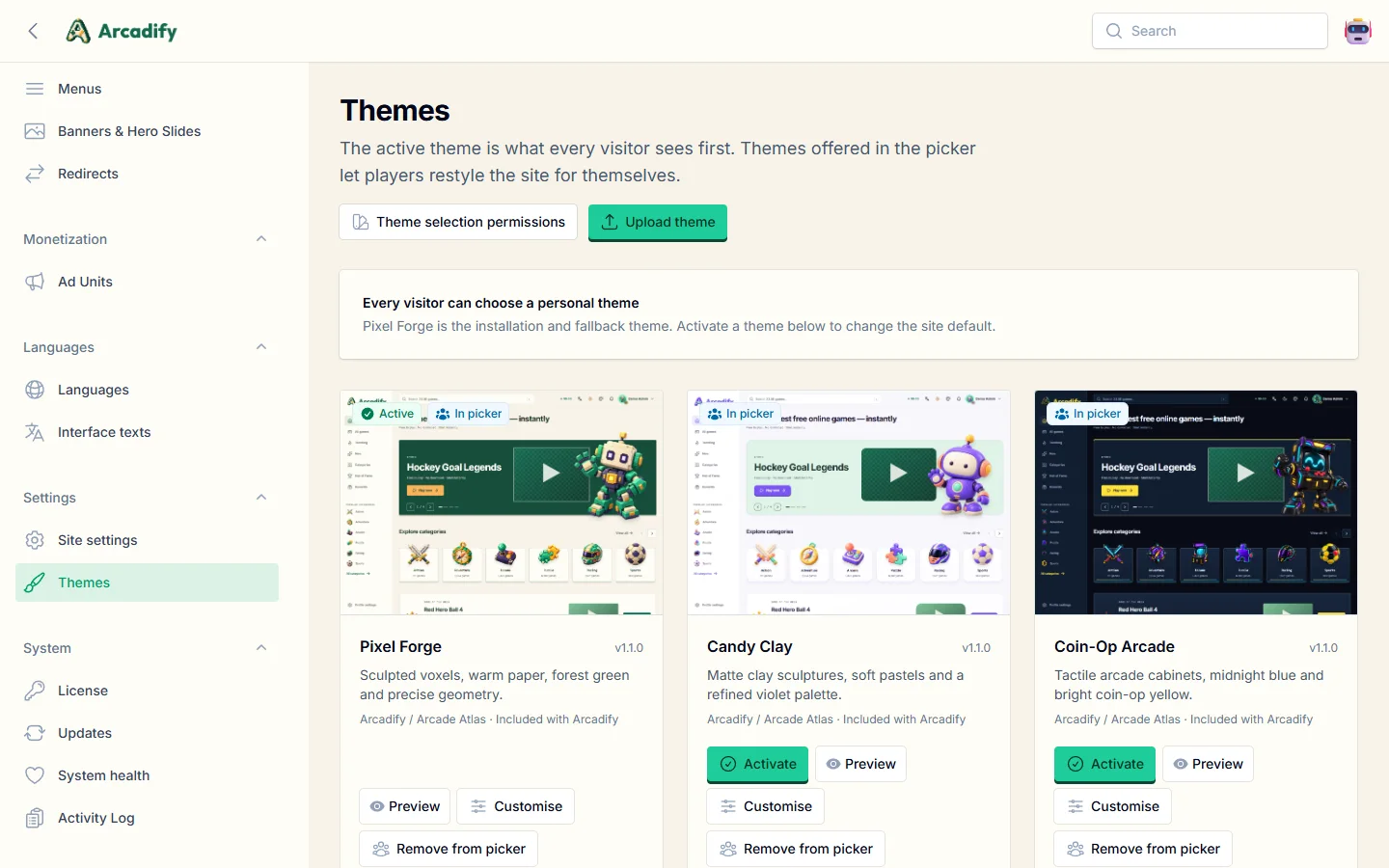
- Activate a theme to make it the site's default look.
- Customise changes colours and shapes without touching code.
- Visitor picker: offer selected themes to visitors (everyone, or signed-in members only). Member choices are saved to their accounts.
- Upload a theme packaged as a
.zipfile withtheme.jsonat its root. - Choose the default mode (light, dark or system) in Settings → Appearance.
php artisan arcadify:themes:publish) to copy compiled theme files to public/themes.Creating a theme
A theme is a folder inside themes/:
themes/my-theme/
├── theme.json          # manifest (required)
├── screenshot.webp     # 800×1100 preview for the admin panel
├── resources/theme.css # Tailwind CSS v4 entry point
├── views/              # optional Blade overrides (same paths as resources/views)
└── lang/               # optional JSON translation overrides (en.json, ar.json…)
{
"slug": "my-theme",
"name": "My Theme",
"version": "1.0.0",
"author": "Your name",
"description": "A short description shown in the admin panel.",
"parent": "pixel-forge",
"screenshot": "screenshot.webp",
"entries": ["resources/theme.css"],
"supports": { "dark_mode": true, "light_mode": true, "rtl": true },
"settings": [
{ "key": "accent", "type": "color", "label": "Accent colour", "default": "#146a4f", "css_var": "--ac-accent" }
]
}parent(optional) inherits another theme's views, texts and artwork; override only what you change.settingsbecome form fields under Customise; values withcss_varare written as CSS custom properties (colours and sizes are validated).- Views in
views/take precedence over the core views, so you can restyle any page or component. - Build the CSS with Node.js 20+:
npm installonce, thennpm run build. Zip the folder (with the compiled assets) to install it on other sites.
SEO
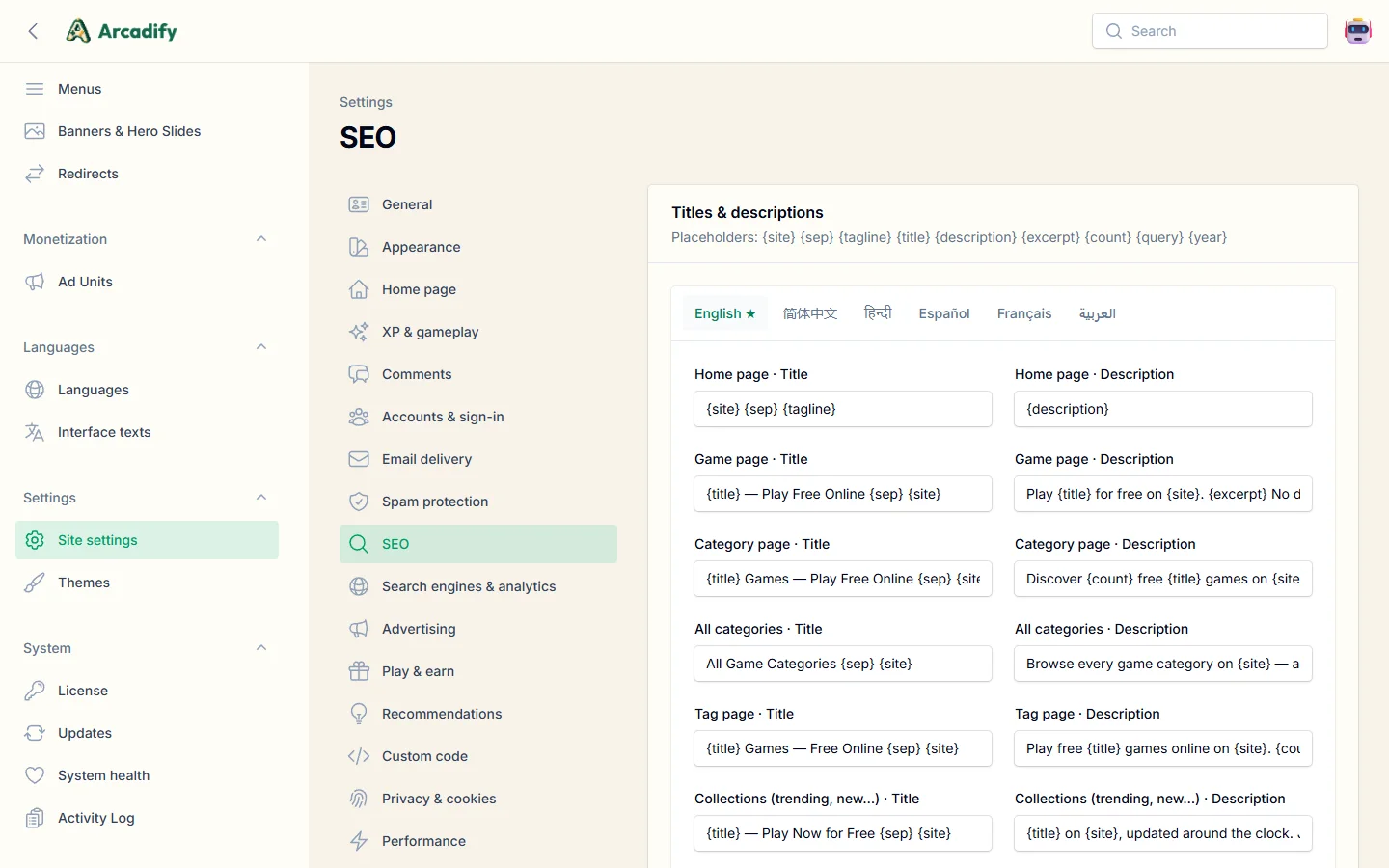
- Templates: Settings → SEO defines the title and description of every page type, per language, with placeholders:
{site}{sep}{tagline}{title}{description}{excerpt}{count}{query}{year}. Games, categories, tags and pages can override them individually. - hreflang & canonical tags for every language, with Open Graph, Twitter cards and structured data (VideoGame, ItemList, BreadcrumbList, ProfilePage, WebSite search box, Organization).
- Sitemaps:
/sitemap.xmlindexes per-language sitemaps for collections, categories, games (with images), tags and pages. It is referenced fromrobots.txt, which you can edit. - IndexNow: Bing, Yandex, Naver, Seznam and Yep are notified of new and changed pages instantly. Baidu link submission is supported too.
- Verification & analytics: Google, Bing, Yandex, Baidu and Naver verification, Google Analytics, Google Tag Manager, Microsoft Clarity, Yandex Metrica and Baidu Tongji in Settings → Search engines & analytics. Anything else goes in Settings → Custom code.
- Thin content control: keep search results, player profiles and tag pages with few games out of search engines.
Advertising
Create ad units in Monetization → Ad units with code from AdSense, Google Ad Manager or any network, and assign them to a placement. Several units can share a placement; the rotation weight decides how often each one shows. Units can target guests or members, devices and date ranges.

| Placement | Placement |
|---|---|
| Header (all pages) | Home · below the hero |
| Home · between sections | Listings · above the grid |
| Listings · in-feed card | Game page · above the player |
| Game page · below the player | Game page · sidebar |
| Game page · pre-roll overlay | Game page · below the description |
| Footer (all pages) | Mobile sticky anchor |
In Settings → Advertising you can turn ads off globally, hide them from signed-in players or above a given level, enable a pre-roll before games start, set the in-feed frequency and publish your ads.txt file.
Ad-block guard
Visitors who block your ads can keep playing, but their progression stays frozen until they allow the ads: no XP, no level-ups, no playtime added to their counters, no new achievements and no reward event progress. Nothing they already earned is touched, and everything starts counting again as soon as the blocker is off. Players see a clear message (a dialog for members, a banner for guests) explaining what is frozen and how to turn their blocker off, a Frozen badge in the header and a reminder on the game player. The XP bar of their own account turns icy while it lasts.
The browser checks itself every few minutes, but the server decides: each check loads small first-party scripts addressed like ad scripts, which ad blockers stop, and each one answers with a receipt signed for the visitor's session. Progress counts only with fresh receipts and no other sign of blocking (hidden ad-like elements, unreachable ad networks), so editing the page script or blocking the check never unfreezes anybody. Daily visit bonuses wait until the check passes, and plays started while frozen are counted once the blocker is off.
| Setting | What it does |
|---|---|
| Freeze progress while an ad blocker is on | Turns the guard on (default). It only applies while ads are on, and never to players who see no ads because of the member setting or the level perk. |
| Also check the ad networks your ads load | Also catches browser shields and DNS blockers (Brave, strict tracking protection, Pi-hole, NextDNS) by checking that the scripts of your live ad units can load. Only scripts your server could reach itself are used, so a dead or mistyped address never freezes anybody, and while the cookie banner is on these checks wait for the visitor’s consent. Turn it off if many visitors live where your ad network is unavailable. |
| Extra ad network scripts to check | Optional https addresses (one per line), for example the script of an ad network you load through Custom code. |
The settings page also shows how many play sessions of the last 7 days ran with an ad blocker. Game statistics keep counting every play, so popularity and trending stay accurate.
/prebid/…, /includes/ads/… and /content/ads/…. They have no file extension, so servers that serve .js files themselves still route them to Arcadify; do not add server rules that block these paths.XP, levels & achievements
Players earn experience points (XP) and climb 100 levels grouped into tiers with 16 honor emblems. All values are adjustable in Settings → XP & gameplay:
| Action | Default XP | Daily limit |
|---|---|---|
| Each minute of active play | 2 | 240 minutes counted |
| Discovering a new game | 15 | 150 XP |
| Daily visit | 10 | — |
| Streak bonus per consecutive day | 5 | 50 XP |
| Approved comment | 5 | 25 XP |
| Rating a game | 2 | 20 XP |


- Only real, active play counts: the game page reports a heartbeat while the tab is visible.
- Achievements track 18 statistics: total plays, different games, minutes played, games in a category, daily streak, level reached, comments posted, likes received, games rated, favourites, achievements unlocked, account age, late-night, sunrise and weekend plays, Game of the Week plays, a completed profile and rewards claimed. Secret achievements stay hidden until unlocked.
- Avatars: players choose one of 124 3D characters or upload a photo; legendary avatars unlock at higher levels.
- Administrators can adjust a player's XP or wallet from Community → Players; every change is written to the activity log.
Reward events & prizes
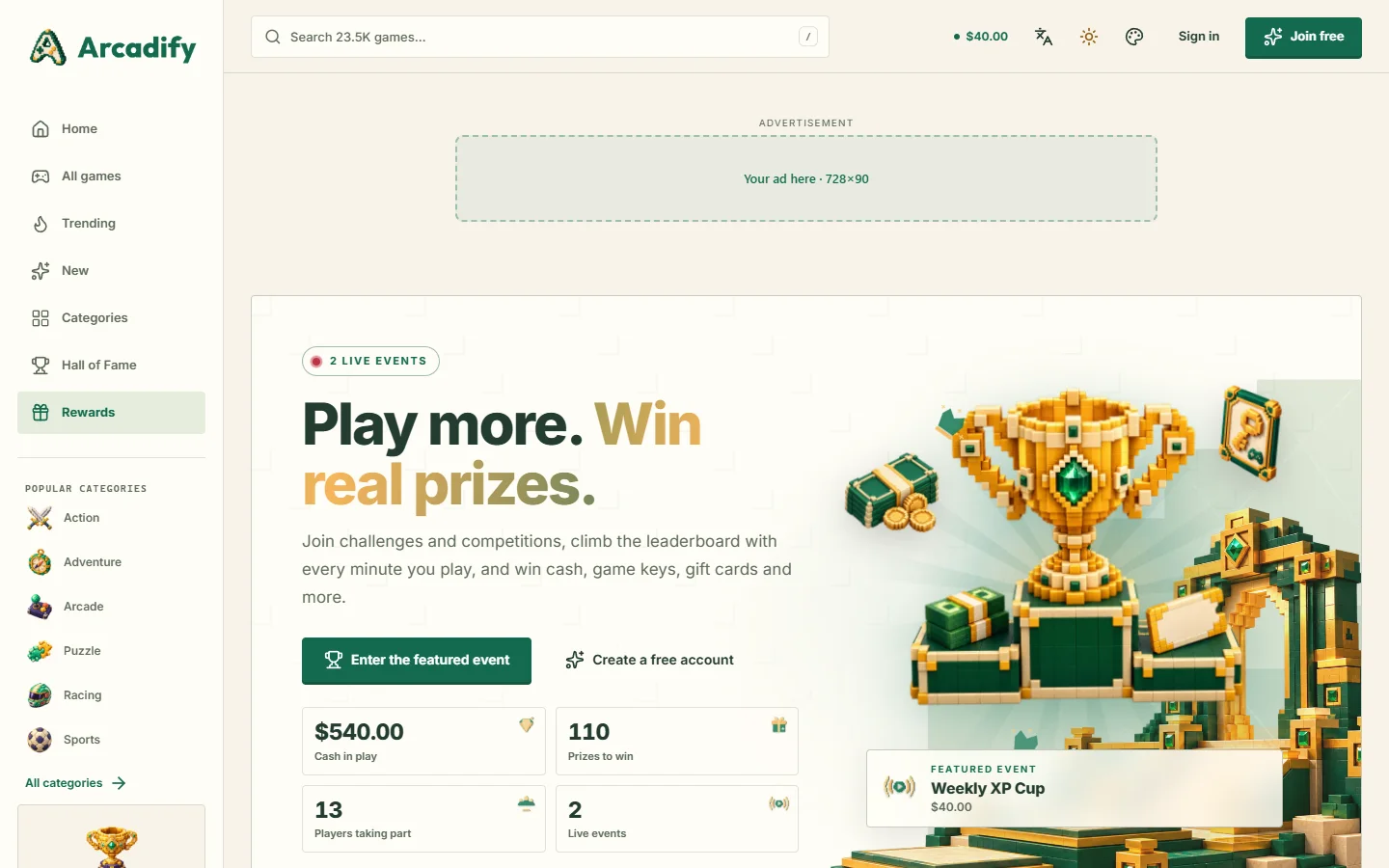
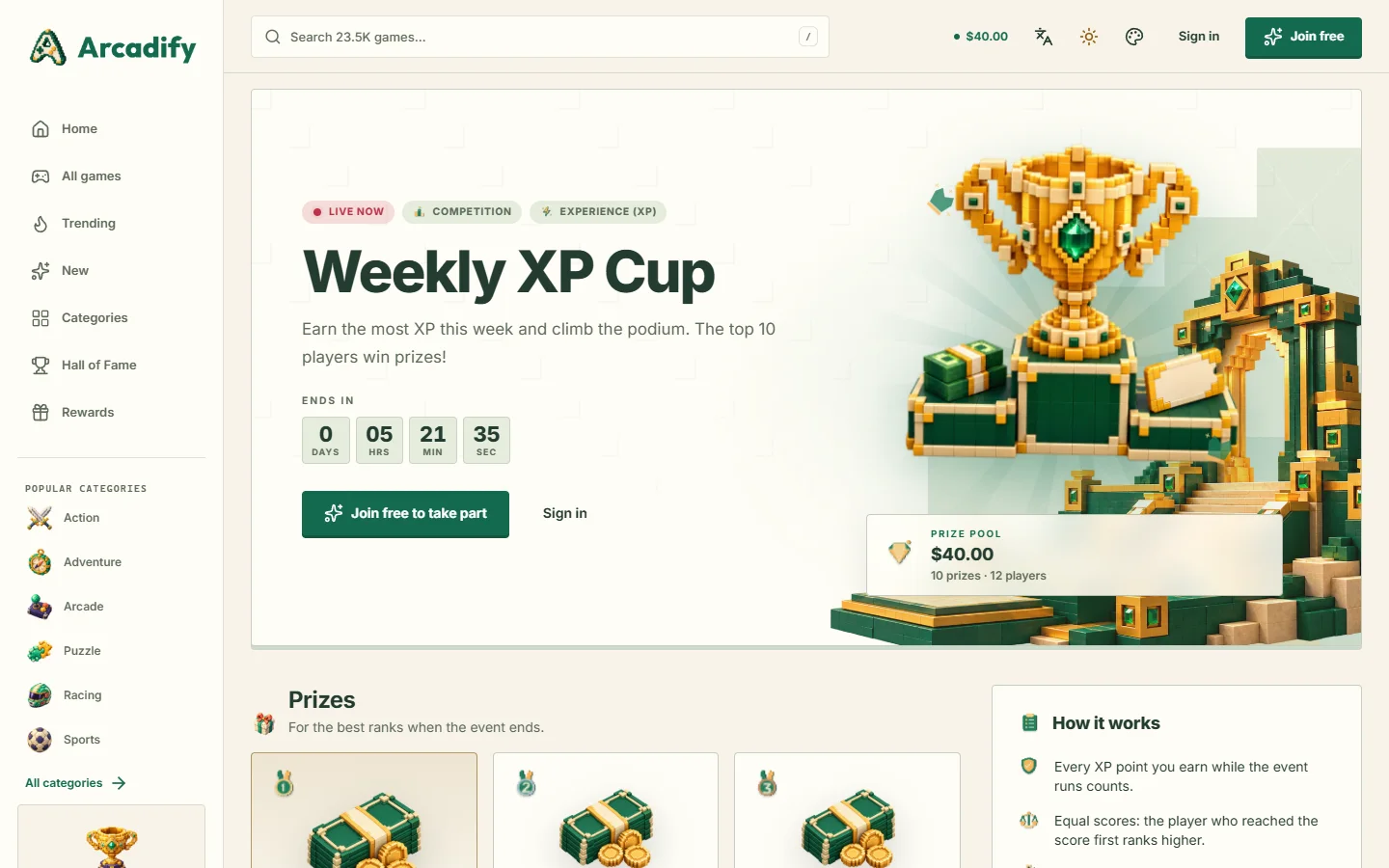
Reward events turn playtime into prizes and give players a reason to come back every day. Run challenges where everyone who reaches a goal wins, or competitions where the best players of a period win by rank, and give away cash, game keys, gift cards, bonus XP, physical items or anything else you like. Turn the program on or off in Settings → Play & earn; when it is off, events, wallets and withdrawals disappear everywhere and existing balances are kept.
Two formats
| Format | Who wins | For example |
|---|---|---|
| Challenge | Every player who reaches the target while the event runs, or only the first players when you limit the number of winners. | “Play 10 hours this month and win $5.” |
| Competition | The best ranks when the event ends. Each prize covers one rank or a range of ranks, such as ranks 4 to 10. | “The 3 players who earn the most XP this week win game keys.” |
What counts
- Playtime: verified active play only; idle tabs do not count.
- Experience (XP): XP earned during the event. Choose the sources that count; event prizes and manual adjustments are excluded by default.
- Game sessions and different games: sessions that last at least the minimum length you set.
- Custom score: your own formula with points per minute played, per XP, per session and per new game.
You can count only some categories or games, cap what counts per day so steady players can keep up with marathon players, and require a minimum score to win. Equal scores are ranked by who reached the score first.
Creating an event

- Open Play & earn → Reward events → New. On Event, enter the title and description in each language, the dates, an optional image (the active theme's trophy artwork is used otherwise) and whether the event repeats every week or every month.
- On Format & scoring, choose a challenge or a competition, what counts, the target or minimum score, and any limits.
- On Prizes, add as many prizes as you like and, for a competition, the ranks each one covers. Paste game keys, gift card or voucher codes one per line: each winner receives one code, revealed only to them. Steam, Epic, GOG and Xbox keys get their store link automatically.
- On Rules & eligibility, decide whether players must join first, the maximum number of participants, the minimum level and account age, whether a verified e-mail is required, how many days winners have to claim, and your own rules text.
A repeating event starts its next edition automatically with the same prizes and rules. Unused codes carry over, while the codes still owed to winners who have not claimed yet stay reserved for them. Duplicate prepares a similar event in one click, and Publish the results ranks an ended competition right away (this also happens automatically a few minutes after it ends). Featured events lead the rewards hub and the header badge, and the Reward events section of the home page builder shows live events on your home page.
Prizes and deliveries
- Cash is credited to the winner's wallet when they claim it, then withdrawn like any other balance.
- Bonus XP is added to the winner's level progress at once.
- Game keys, gift cards and custom rewards reveal a code from the pool. When the pool is empty, and for physical prizes, the claim waits in Play & earn → Prize deliveries: deliver it with a code or a message (a tracking number, for example) and the winner is notified. Codes you add to the pool later go to waiting winners automatically.
- Winners are notified on the site and by e-mail and find everything in Account → My prizes. Unclaimed prizes expire after the claim period you set.
- An event's Standings tab lets you disqualify players who broke the rules; its Winners tab lists every prize with its delivery status.
Wallets and withdrawals
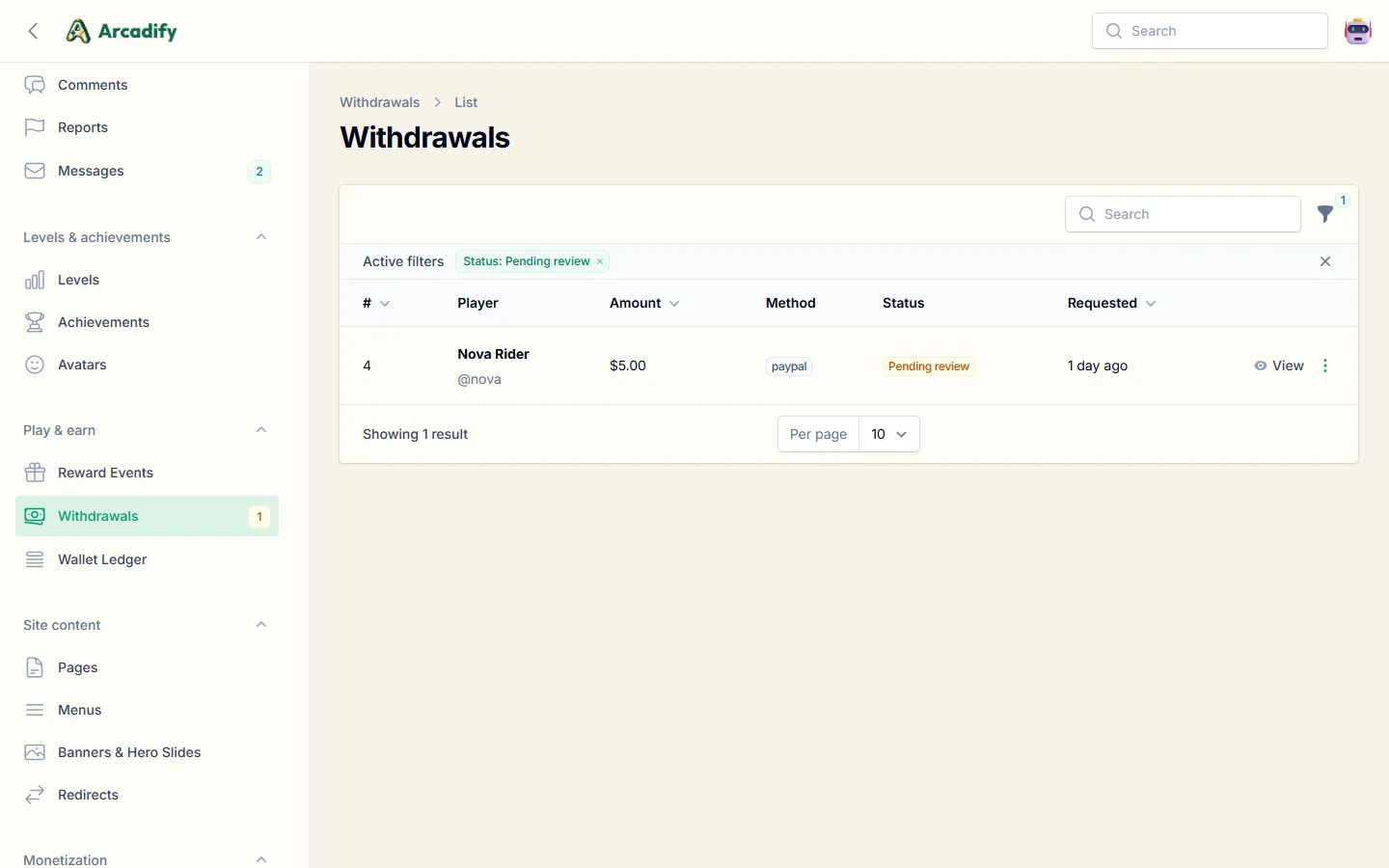
- Players request a withdrawal with one of the payout methods you enable (PayPal, Payoneer, bank transfer, USDT TRC20, or your own with custom fields).
- Review requests in Play & earn → Withdrawals: mark them paid with a payment reference, or reject them (the funds return to the player's wallet).
Settings include the currency, minimum withdrawal, fee percentage, verified e-mail requirement, open requests per player and the program terms shown on the rewards page. Turning wallets off hides cash prizes and pauses cash claims; events with other prizes keep running, and players keep the cash prizes they already won until wallets are back.
Accounts, email & security
Social sign-in
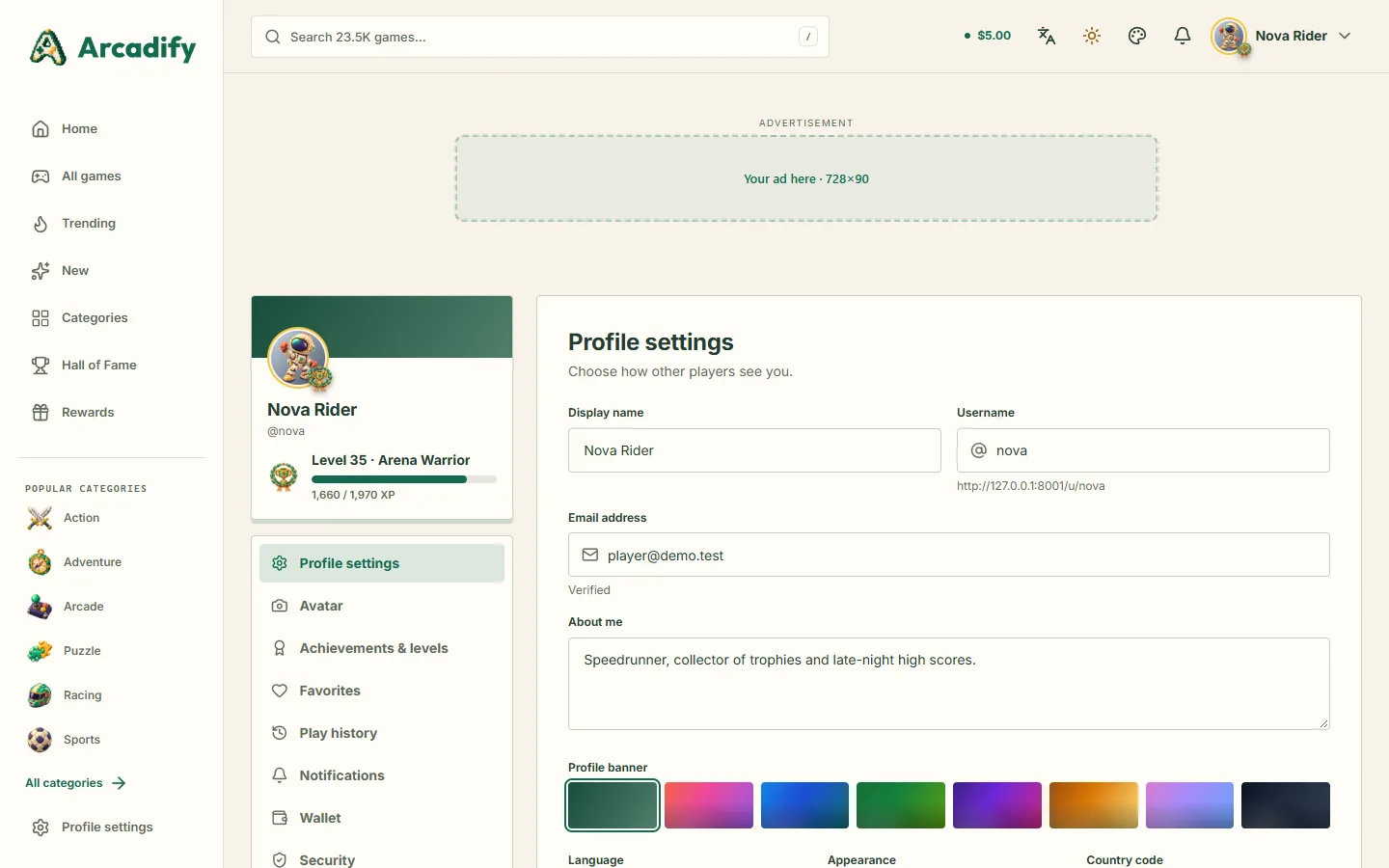
Google, Facebook, X (Twitter), Discord and GitHub sign-in are configured in Settings → Accounts & sign-in. Create an OAuth app in each developer console, paste the client ID and secret, and register the callback URL shown next to each provider. Secrets are stored encrypted.
Settings → Email delivery supports SMTP (recommended), the server's sendmail, or writing emails to the log for testing. Use Send a test email to confirm delivery. Email verification can be required for withdrawals or for all players. Verification and password-reset emails are sent in the player's language.
Spam protection
- CAPTCHA: Cloudflare Turnstile (free, usually invisible), Google reCAPTCHA or hCaptcha, per form (sign-up, sign-in, comments, contact).
- Comment moderation: publish immediately, review each player's first comment, or review every comment. Blocked words, link limits and a minimum level to comment.
- Rate limits protect sign-in, search, plays and comments automatically.
Privacy
Settings → Privacy & cookies shows a GDPR cookie banner; analytics only run after consent. Players can delete their account and personal data themselves.
Security by design
- Security headers, CSRF protection and encrypted secrets. Game embed addresses must be
https://pages, so nothing else can run inside your site. - Image URLs are only fetched from public addresses (no internal network access), and uploads are re-encoded.
- Updates and license certificates are verified with Ed25519 signatures before they are trusted.
Performance
- Page cache: pages are cached for guests and served instantly; personal sections still load per visitor. Configure in Settings → Performance.
- Search uses MySQL full-text indexes in every language (prefix matching, relevance ranking), with a fallback for scripts without word spacing.
- Optimize for production in System health caches configuration, routes and views. Run it after changing
.env. - Clear all caches after manual file changes.
- Uploaded images are converted to WebP and resized automatically.
- Keep
APP_DEBUG=falsein.envon a live site: debug mode can reveal private details in error pages.
Updating
With an active license, System → Updates lists new releases with their release notes (also published at ekr-portal.cloud/changelog). Click Install update:
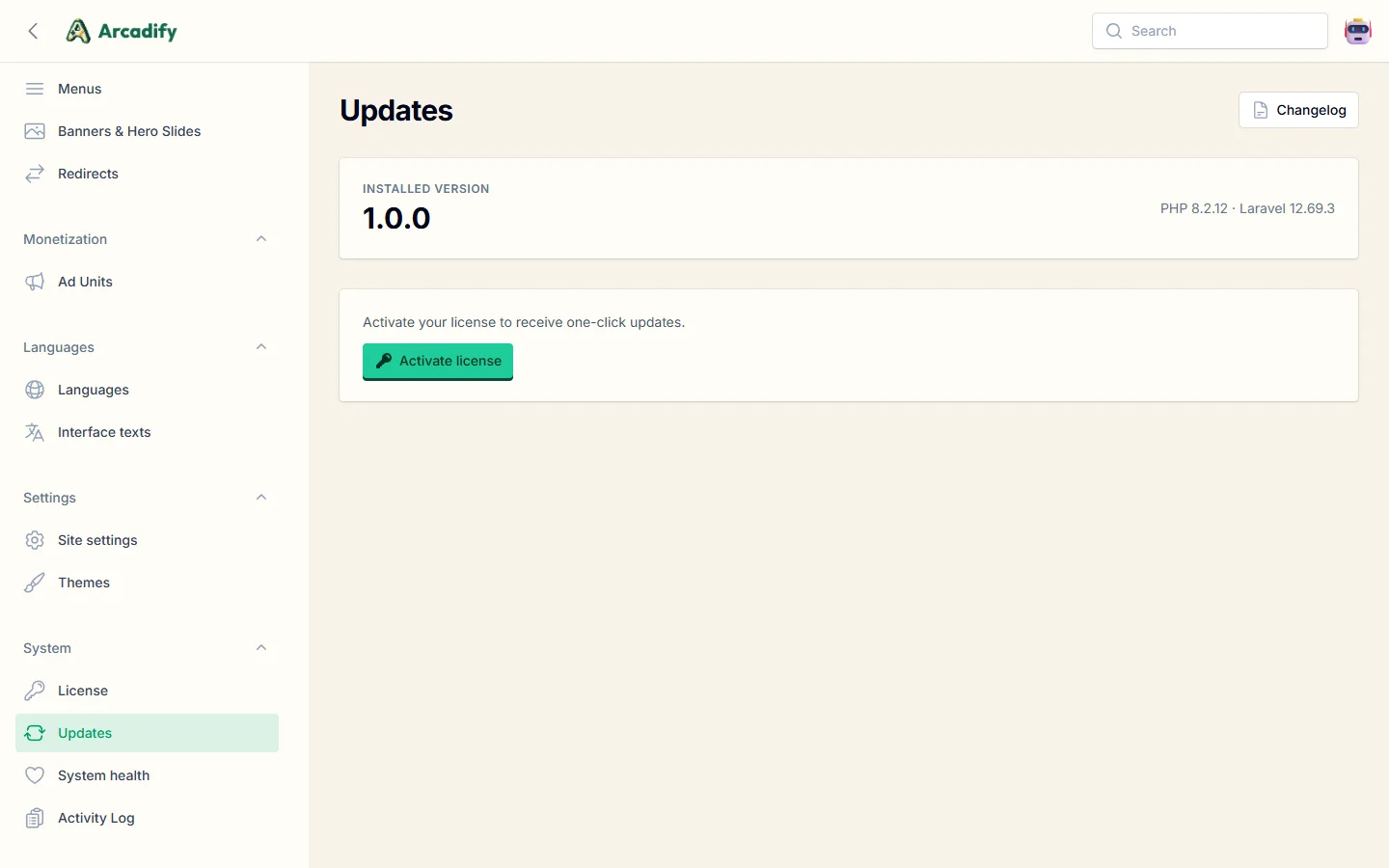
- The package's Ed25519 signature, checksum and every file hash are verified before anything changes.
- The site switches to maintenance mode for a moment. Every changed file is backed up first and restored automatically if anything fails.
- Database migrations run automatically and caches are cleared.
A database backup beforehand is still recommended. Your settings, translations made in the admin panel, uploads and installed themes are preserved.
Manual update
Releases that change PHP dependencies are delivered as a full package. To install a full package:
- Back up your files and database.
- Upload the new version over the old one, keeping
.env,storage/,public/uploads/and any theme you created. - Open System health and click Clear all caches, or run
php artisan migrate --forceandphp artisan optimize:clear.
Live demo mode
Running a public showcase for your clients? Demo mode turns a copy of Arcadify into a safe live demo: the storefront works exactly like a real site, while the admin panel can be explored but never changed.
- Add
ARCADIFY_DEMO_MODE=trueto.env. Optional:ARCADIFY_DEMO_MAINTAINERS=you@example.comfor the accounts that keep full access,ARCADIFY_DEMO_PURCHASE_URL=…for the "Get Arcadify" button andARCADIFY_DEMO_ACCOUNT_HOURS=24for how long accounts created by visitors last (0keeps them). - Run
php artisan arcadify:demoto create the demo administrator and player. The scheduler resets them every hour. - The sign-in and sign-up pages now show Admin demo and Player demo buttons next to the normal forms.
| Area | In demo mode |
|---|---|
| Storefront | Works like a real site for everyone: sign up, sign in, reset a password, play, react, comment, report, claim rewards, request payouts, edit your own profile, avatar and password, or delete your account. |
| Admin panel | Read-only for everyone except the maintainers. Every screen and form opens; saving shows a "changes are disabled" popup and nothing is stored. Uploads and actions such as test e-mails, cache tools, license changes and updates are blocked. E-mail addresses, payout details and contact messages of real people are masked; the demo accounts and showcase records on example.com addresses stay visible. |
| Shared demo accounts | Their password, e-mail, profile, avatar and wallet cannot be changed, the accounts cannot be deleted and their passwords cannot be reset, so they work the same for every visitor. A notice on their settings pages offers a free account of one's own. They never receive e-mail or contact messages, and each visitor's language and theme choice stays in their own browser. Staff tools on the storefront, such as removing other members' comments, are read-only like the admin panel. |
| Hourly reset | Puts the demo accounts back, removes the comments visitors posted with them and deletes accounts created by visitors once ARCADIFY_DEMO_ACCOUNT_HOURS have passed. Accounts created before demo mode was switched on are never touched. |
Command line
Everything is available from the admin panel; these commands are for servers with SSH access.
| Command | Purpose |
|---|---|
php artisan arcadify:providers:sync {provider?} --limit= | Import the newest games from one or all auto-sync providers |
php artisan arcadify:catalog:import --chunk=1000 | Import a starter catalogue file, if you have one |
php artisan arcadify:trending | Recalculate trending scores |
php artisan arcadify:similarities --limit=250 | --all | Refresh "similar games" recommendations |
php artisan arcadify:rewards | Publish the results of ended reward events, start repeating editions and expire unclaimed prizes (runs every five minutes) |
php artisan arcadify:index-now | Send pending IndexNow notifications |
php artisan arcadify:themes:publish | Copy compiled theme files to public/themes |
php artisan arcadify:translations:scan --check | Report translation completeness per language |
php artisan arcadify:license:refresh | Renew the license certificate |
php artisan arcadify:demo | Create or reset the live demo accounts and delete expired visitor accounts (demo mode only) |
php artisan arcadify:prune | Remove expired sessions, old logs and statistics |
Troubleshooting & FAQ
I see "500 Internal Server Error"
Check storage/logs/laravel-YYYY-MM-DD.log for the exact error. The most common causes are missing PHP extensions, an outdated PHP version, or folders that are not writable (storage, bootstrap/cache). If the log is empty, your host's error log (cPanel → Errors) usually shows an .htaccess problem: ask your host to enable mod_rewrite and AllowOverride All.
The site has no styles or images
Open System health and click Publish theme assets. Also make sure the hidden .htaccess files were uploaded.
"Page expired" (419) after a form submit
The session expired or cookies are blocked. Refresh and try again. If it happens constantly, make sure storage/framework/sessions is writable and the site address in Settings → General matches the address in the browser (including https and www).
License activation fails
See Activation messages. Activation needs outgoing HTTPS from your server to ekr-portal.cloud.
Emails are not delivered
Use SMTP credentials from your host or an email service, then Send a test email. Check the spam folder and that your domain has SPF/DKIM records.
New games are not imported every night
Check System health: it shows when the scheduler last ran. Add or fix the cron job and make sure nightly sync is enabled on each provider.
I forgot the administrator password
Use Forgot password? on the sign-in page. Without working email, an administrator with SSH access can run php artisan tinker and set a new password on the user.
Can I move the site to another domain?
Yes: deactivate the license on the old site, move files and database, update APP_URL in .env and the site address in Settings → General, clear all caches, then activate on the new domain.
Credits & licenses
Arcadify is built with these excellent open-source projects. Their licenses travel with the code in vendor/.
| Project | License |
|---|---|
| Laravel framework, Laravel Socialite | MIT |
| Filament (admin panel), Livewire | MIT |
| spatie/laravel-settings, spatie/laravel-translatable | MIT |
| Intervention Image, Symfony components | MIT |
| paragonie/sodium_compat (signature verification fallback) | ISC |
| Blade Icons, Heroicons | MIT |
| Alpine.js, Tailwind CSS, Vite | MIT |
| Microsoft Fluent Emoji (3D icons and avatars) | MIT |
| Lucide icons | ISC |
| Simple Icons (sign-in brand marks; trademarks belong to their owners) | CC0 1.0 |
| Inter, Cairo, Outfit, Nunito, Rubik fonts | SIL Open Font License 1.1 |
Games listed on your portal belong to their developers and distributors and are shown through the providers' official embed programs. Game names, thumbnails and descriptions come from the providers' feeds.
Changelog
1.1.0 · Reward events, competitions and the ad-block guard
- Ad-block guard: visitors who block your ads keep playing, but their XP, level, playtime counters, achievements and reward progress stay frozen until they allow the ads, with a clear message, a Frozen badge and a reminder on the game player. Server-verified checks (signed receipts) catch extensions, hidden ad slots, browser shields and DNS blockers. On by default in Settings → Advertising; players who see no ads are never affected.
- Reward events rebuilt: challenges and ranked competitions over any period, scored by playtime, XP, game sessions, different games or your own formula.
- Any mix of prizes per event: cash, game keys with code pools (Steam, Epic, GOG, Xbox, PlayStation and more), gift cards, bonus XP, physical and custom rewards, for one rank or a range of ranks.
- Flexible rules: sign-up or automatic entry, participant and winner limits, minimum level, account age and verified e-mail, daily caps, game and category filters, a minimum winning score, tie-breaks, claim deadlines and weekly or monthly repeats.
- New rewards hub and event pages with live standings, an animated podium, countdowns and winner announcements, with new artwork in all seven themes.
- My prizes in the player account, on-site and e-mail notifications, and a Prize deliveries inbox for keys and items to hand over.
- A Reward events section for the home page, and the featured event in the header badge.
- Turning wallets off now pauses cash prizes instead of hiding the whole rewards program.
Existing reward events and their winners are converted automatically. The update adds tables for prizes, codes and awards.
1.0.1 · Live demo and admin improvements
- Live demo mode: visitors can now create their own accounts and use every storefront feature; the admin panel stays fully read-only.
- Live demo mode: the shared demo accounts keep their password, e-mail, profile, avatar and wallet, and cannot be deleted or reset by visitors.
- Live demo mode: personal details of real people are masked in the admin panel, and accounts created by visitors are deleted automatically (
ARCADIFY_DEMO_ACCOUNT_HOURS). - Fixed: the role and status chosen in Players → Edit were not saved.
- Deleting an account now also updates the comment, like, favorite, rating and achievement counters.
Update with one click in System → Updates, or upload the full package as described in Updating. The update adds one database column.
1.0.0 · Initial release
- HTML5 arcade storefront with seven themes, light and dark modes, and full right-to-left support.
- Import center for six providers with nightly sync and revenue-share parameters.
- 100 levels with 16 honor emblems, 53 achievements, 124 avatars and the Wall of Fame.
- Play & earn: reward events, wallets and withdrawals.
- Six complete languages, machine translation and a translation editor.
- SEO templates, sitemaps, hreflang, structured data and IndexNow.
- Ad units for 12 placements, pre-roll ads and ads.txt.
- One-click installer, EKR license activation and signed one-click updates.
- Live demo mode for public showcases.
Support
Before contacting support, please check Troubleshooting and System health. Open a ticket from your account at ekr-portal.cloud/support or through the marketplace item page, and include your purchase code or license key, your site address, the PHP version and the relevant lines from storage/logs.